
 Fluid Engineering Software
Integrated Mechatronic System Design for Hydraulic and Pneumatic Systems
The successful planning and documentation of advanced industrial machinery—including pneumatic, hydraulic, and process systems—require seamless integration between the mechanical functions and their electrical controls. For instance, when designing complex press lines, a specialised hydraulic circuit diagram software is essential for validating the safety and sequence of high-pressure components before any wiring begins. When design tools operate in isolation, the necessary data for procurement, assembly, and maintenance is easily fragmented, leading to costly errors and delays across crucial mechatronic tasks.
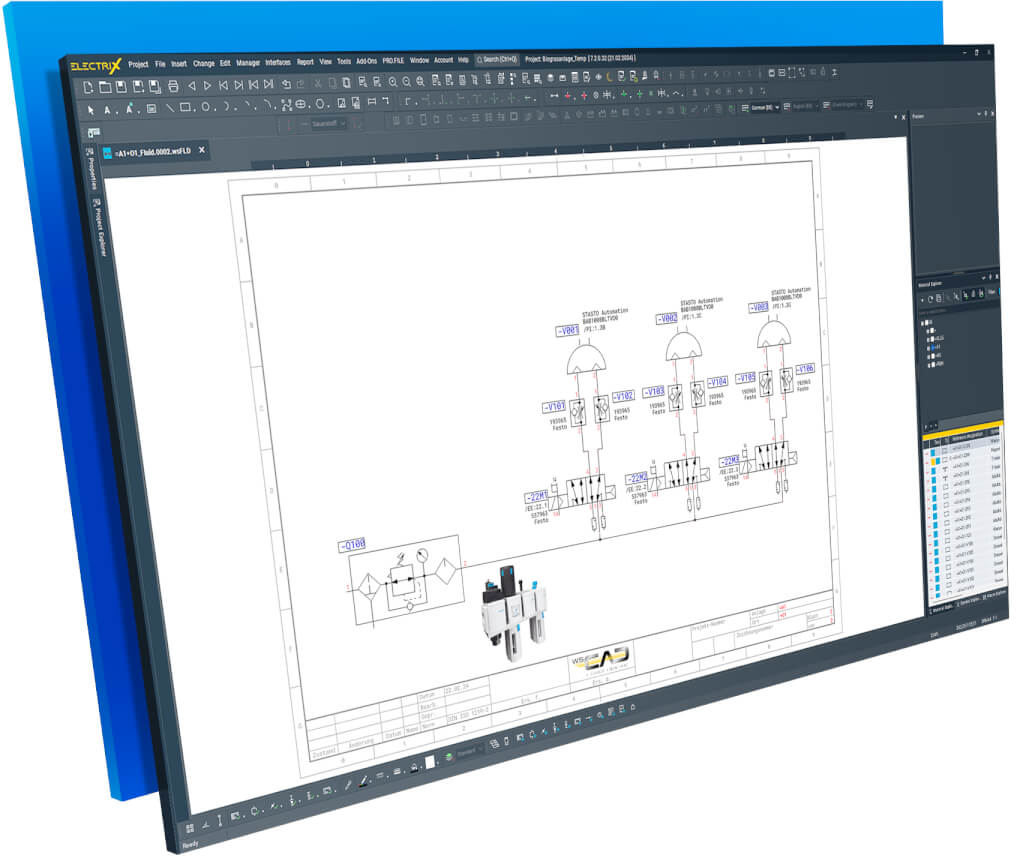
WSCAD ELECTRIX AI offers a comprehensive and unified platform, providing a fast, intuitive, and efficient toolset for the continuous project planning and documentation of all fluid power systems. The planning and documentation of pneumatic and hydraulic machines and plants is performed with the aid of the Fluid Engineering discipline. Fluid Engineering includes all the benefits of the WSCAD Electrical Engineering software, supplemented by special fluid functions. Designers, developers, and maintenance engineers thus have a comprehensive set of fast, intuitive and efficient tools. This ensures the integrated planning and documentation of all mechatronic tasks is handled continuously on a single platform.
Key Strategic Benefits for Fluid Engineers
- Integrated Mechatronic Planning: Achieve continuous project planning and documentation for all mechatronic tasks, bridging the gap between fluid power and electrical controls.
- Comprehensive FE Design: Plan and document intricate pneumatic and hydraulic machines and systems efficiently on a single platform.
- Accurate Documentation Outputs: Automatically generate complete documentation, including material lists, resource lists, and tube lists for fluid components.
- Enhanced Financial Control: Generate material lists that, when coupled with an ERP system, allow for immediate calculation of prices for offers during the planning phase.
- Standards-Compliant Tools: Utilize standardized symbols as per DIN ISO 1219 and access powerful functions like automatic generation of tube labels.


Core Features & Integrated Fluid System Design
The AI Copilot: Command Center of Efficiency (Fluid Focus)
The AI Copilot represents a powerful advancement over manual design, allowing engineers to delegate complex, fluid-specific tasks using simple text commands. This fundamentally changes the workflow from click-intensive drafting to high-speed, conversational design, boosting productivity for all users1111.
- Intelligent Component Selection & Placement: Instead of browsing hierarchical libraries, use the AI Copilot to instantly place fluid-specific macros or components2. You can command the AI to: “Place directional control valve 4/2” and have the intelligent, associated symbol appear instantly on your cursor.
- Unique Fluid List Generation: Automatically generate the specialized documentation required for production. A simple command, such as: “Create the tube list for the pneumatic assembly,” instantly generates the critical lists needed for procurement and manufacturing333.
- Calculation and Sizing Assistance: Eliminate manual research in tables and data sheets. Ask the Copilot for technical assistance related to sizing or component specifications. You can type: “Give me a hydraulic tube with 500 bar rating and DN10 flow,” and the AI provides the component or attribute instantly4.
- Component Retrieval: Solve complex data searches instantly. Use the command: “Tell me in which project I last used the filter element F-4711,” and the AI Copilot immediately provides the exact project name and revision date.
- Targeted Error Verification: The command, “Find the errors in my project,” scans your fluid diagram in seconds to identify logical faults, such as open connections or symbols without assigned article numbers, drastically reducing the time spent on manual quality checks6666.
Standardization & Interdisciplinary Documentation
The core value of Fluid Engineering in WSCAD is guaranteeing the continuity of data (SSoT) between the logical fluid diagram and the entire mechatronic system7. This relies on strict adherence to standards and generating unique, specialized documentation.
- Fluid-Specific Standards: Create all documentation using standardized symbols as per DIN ISO 12198. The software enables the continuous project planning and documentation of all mechatronic tasks9.
- Unique Fluid Outputs: The platform automatically generates key deliverables unique to fluid power, including connection diagrams 10, and specific outputs of tube, resource, and materials lists for fluid components11.
- Automated Tube Management: Simplify physical installation by automating the generation of crucial field markers, such as tube labels12.
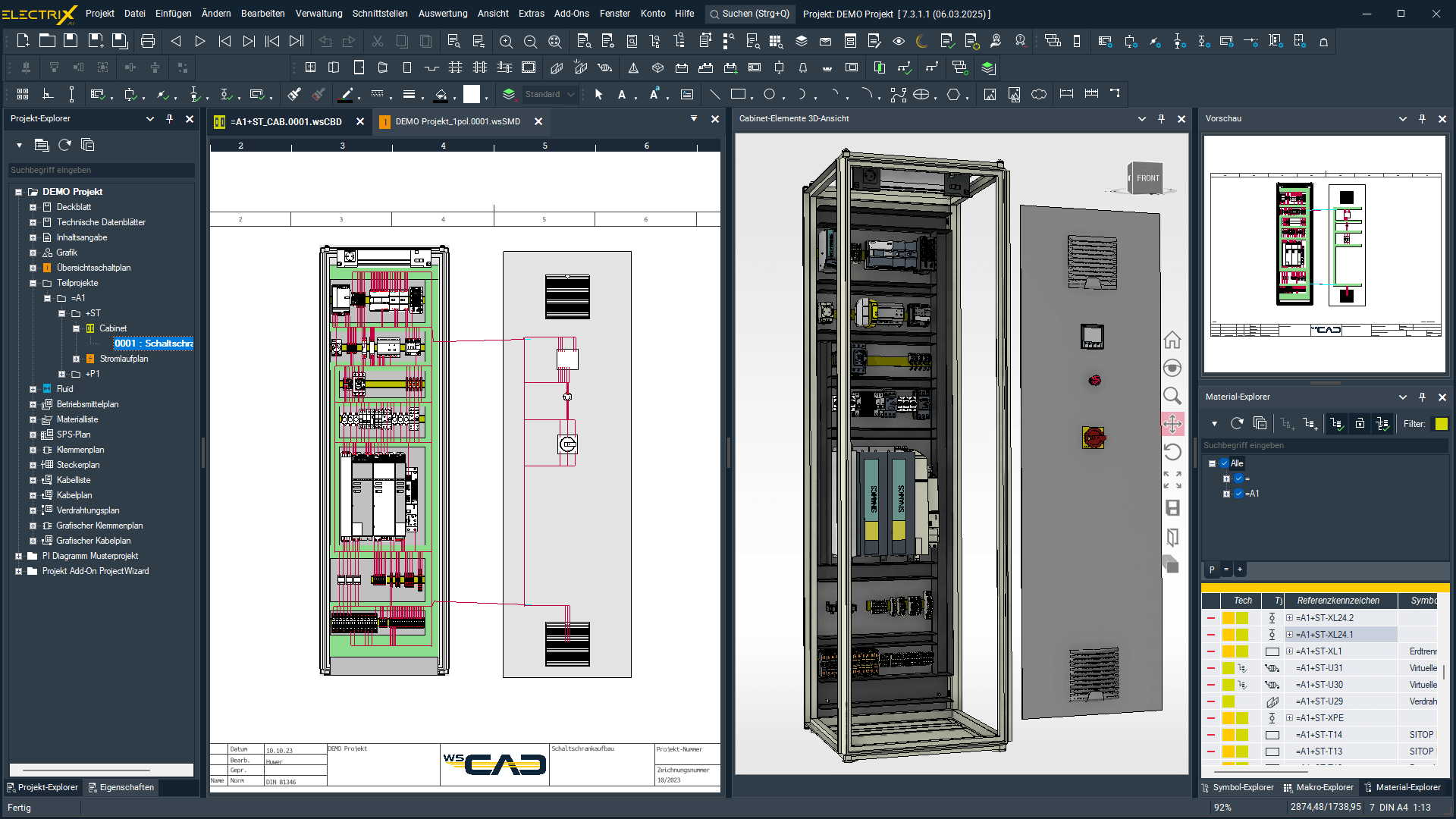
- FE/EE Data Continuity: Changes made in the Fluid Diagram (e.g., adding a solenoid valve) are instantly reflected across the related Electrical Schematic and Bill of Materials. This ensures consistency across the electrical and fluid control circuits.
Workflow Acceleration Tools
WSCAD ELECTRIX AI provides powerful, integrated tools designed to accelerate fluid project initiation, library management, and interdisciplinary collaboration.
- Project Wizard for Fluid Projects: Leverage the Project Wizard Add-On to automatically generate standardized fluid diagrams (and related electrical schematics) using pre-defined fluid macros. This process shortens engineering time for standardized projects from days to minutes.
https://www.youtube.com/watch?v=9L8Roq2oakg - FE Component Libraries (wscaduniverse.com): Access the world’s largest E-CAD library with over 2.2 million component data entries from over 441 manufacturers, ensuring that all your hydraulic, pneumatic, and control components (pumps, valves, cylinders) are linked to accurate manufacturer data and 3D models.
https://www.youtube.com/watch?v=mi8ChL2XVKc - Integrated P&ID Planning: The single-platform architecture seamlessly links the initial process flow visualization from the Piping and Instrumentation Diagram (P&ID) directly to the detailed Fluid and Electrical schematics, ensuring efficient data re-use from concept to construction.
Intelligent Quality Assurance & Verification
The Fluid Engineering module ensures system reliability and reduces the risk of errors by focusing on validation against both standards and the underlying database structure.
- Standards-Based Auditing: Use the design model to audit and verify existing fluid documentation for maintenance and service.
- Design Structure Validation: The AI Copilot supports checks to ensure all necessary components are assigned (e.g., symbols have assigned article numbers) and prevents internal inconsistencies in the design data.
- Continuous Consistency Checks: Because the schematic is the Single Source of Truth (SSoT), the system ensures that component data (e.g., ratings, voltages) remains consistent between the fluid control symbols and their corresponding electrical drivers.
The WSCAD Ecosystem: Continuous Mechatronic Data Flow
The true power of WSCAD ELECTRIX AI is its unified data environment, which transforms the static fluid design into a dynamic, integrated component of the final asset’s lifecycle. This continuous data flow ensures accurate component selection, immediate synchronization with electrical controls, and streamlined production outputs.
Seamless Digital Integration (Fluid Focus)
- Continuous Digital Twin: The fluid schematic and diagram serve as the foundational, static model of the system. This structural description is used to create the definitive Digital Twin when linked to real-world operational data.
- ERP/PLM Integration: Accurate material lists derived from the fluid schematics can be transferred to higher-level enterprise systems. This allows procurement to generate calculations and price overviews for offers immediately during the planning phase.
- Interdisciplinary Handover: The Fluid Engineering data feeds seamlessly into the Electrical Engineering (EE) and Control Cabinet Engineering (CE) modules without data breaks. This synchronizes the fluid control logic (e.g., solenoid valves) with the electrical power and signal flow.
- Manufacturing Integration: The design data generates precise, specialized outputs for production, including tube labels for the fluid installation crew and wiring data for automated machines driven by the electrical control symbols.
Technical Deep Dive: Practical Workflow Scenarios (Fluid-Specific)
These scenarios illustrate how the software’s unique functionalities save time and eliminate errors specific to hydraulic and pneumatic design.
- FE-to-EE Data Synchronization: The single-platform architecture eliminates the manual update burden between disciplines.
- Scenario: A designer changes a standard solenoid valve component in the fluid plan to a new multi-pol valve with different electrical pins.
- Outcome: This change is instantly synchronized across the associated electrical control schematic, the Bill of Materials (BOM), and the physical control cabinet layout. The change is reflected without any manual data entry in the electrical plans.
- FE Library and Standards Usage: The software enforces standardization from the initial component placement.
- Scenario: A designer needs to place a pump or filter element compliant with international standards.
- Outcome: The AI Copilot or Quick Search is used to place a symbol directly linked to data compliant with DIN ISO 1219. This ensures consistency and simplifies auditing.
- Unique Fluid Documentation Output: The system generates specialized documentation required for the fluid installation crew.
- Scenario: The installation crew needs the precise specifications for the hydraulic hoses.
- Outcome: The system automatically generates comprehensive tube lists and connection diagrams with stored pipe information.
- Field Maintenance and Diagnostics: The digital data extends into the operational lifecycle for fault tracing.
- Scenario: A maintenance technician needs to troubleshoot a faulty solenoid valve in the hydraulic system.
- Outcome: Using the WSCAD Cabinet AR App, the technician scans the valve’s QR code on the control panel, instantly retrieving the correct fluid schematic and its corresponding electrical control circuit for rapid fault isolation.
Proof Point: End-to-End Engineering
This case highlights the successful implementation of the IDE strategy for fluid power systems.
Discover how WAGO Kontakttechnik GmbH & Co. KG achieved end-to-end engineering from piping & instrumentation diagrams to electrical schematics and control cabinet design, all within WSCAD SUITE, enabling efficient data re-use throughout their complete engineering process14.

Get Started & Next Steps
Final Call to Action
The industry’s most significant challenges—time pressure and the skilled labor shortage—demand a strategic, integrated solution. WSCAD ELECTRIX AI empowers you to eliminate data fragmentation between electrical and fluid power disciplines, ensuring consistency from the initial hydraulic circuit diagram to the final machine build. Stop relying on manual workflows and gain a competitive edge in continuous mechatronic engineering.
Licensing and Accessibility Summary
The AI-powered features in ELECTRIX AI, including the Copilot and automated layout generation, are included at no extra cost in the normal subscription license. WSCAD ensures this revolutionary technology is accessible to companies of all sizes. Please note: This functionality is not available in the “Compact” edition.
A free, complete trial-version (ELECTRIX AI Ultimate, which includes all modules and add-ons) can be tried without obligation.
Frequently Asked Questions (FAQs)
Q: What standards does the Fluid Engineering module support?
A: The module supports specialized fluid power standards, including symbols as per DIN ISO 1219, ensuring your designs are industry-compliant.
Q: How does WSCAD ensure continuous mechatronic planning?
A: WSCAD ELECTRIX is an Interdisciplinary Engineering (IDE) solution that combines Fluid Engineering, Electrical Engineering, and Cabinet Engineering on a single platform. This ensures immediate data synchronization across all disciplines.
Q: Can I use the automatically generated material lists for financial planning?
A: Yes, material lists generated from the fluid design can be coupled with your ERP system to produce calculations and price overviews for offers immediately during the planning phase.
Q: How quickly can I generate documentation?
A: Generating material lists, tube lists, or performing error checks can be done with a simple text command to the AI Copilot in a matter of seconds, replacing many manual steps.
Q: How does AI help address the skilled labor shortage?
A: The AI Copilot offers intuitive guidance and can perform complex tasks previously reserved for experts, allowing less experienced employees to become productive quickly, relieving pressure on senior engineers.
Q: Is my project data safe when using the AI Copilot?
A: Yes, WSCAD employs a sophisticated security concept. All entries are end-to-end encrypted, and the chat history is deleted after each session, ensuring user anonymity and data protection.
Q: Does WSCAD support integration with PLC programming environments?
A: Yes, WSCAD offers an interface for convenient bidirectional synchronization with environments such as Siemens TIA Portal.
Q: Does WSCAD support older project files or other CAD formats?
A: Yes, WSCAD ELECTRIX handles DXF/DWG file import/export and offers Read & Write data compatibility with WSCAD SUITE projects dating back to 2012.
Q: Does WSCAD support older project files or other CAD formats?
A: The module generates specialized outputs essential for assembly, including tube lists, resource lists, and automatic generation of tube labels.
Get the WSCAD ELECTRIX demo version
Try now the latest version of the electrical CAD software from WSCAD for free
Test the complete WSCAD ELECTRIX demo, including all the modules for free. Simply fill in the form and we will send you an email with the download link.
What you can expect:
- Test all functions for 30 days without obligation
- Highest expansion level of the software with all six electrical design disciplines
- AddOn “ProjectWizard” pre-installed
- Completely free of charge – no credit card details required


