


wscaduniverse.com
High-Quality electrical CAD Parts Data: The Engine for Efficient Electrical Design
The bitter reality of electrical engineering is that engineers often spend more time as “data typists” than as designers. Manually creating symbols and macros, entering pin-outs, measuring pin positions, and searching for datasheets are major bottlenecks that stifle the creative process.
wscaduniverse.com breaks this cycle. With over 2.2 million part data items from more than 441 manufacturers, it provides the world’s largest free electrical CAD data library, reducing part creation time from several hours to just a few seconds and shortening project lead times by up to 40%.









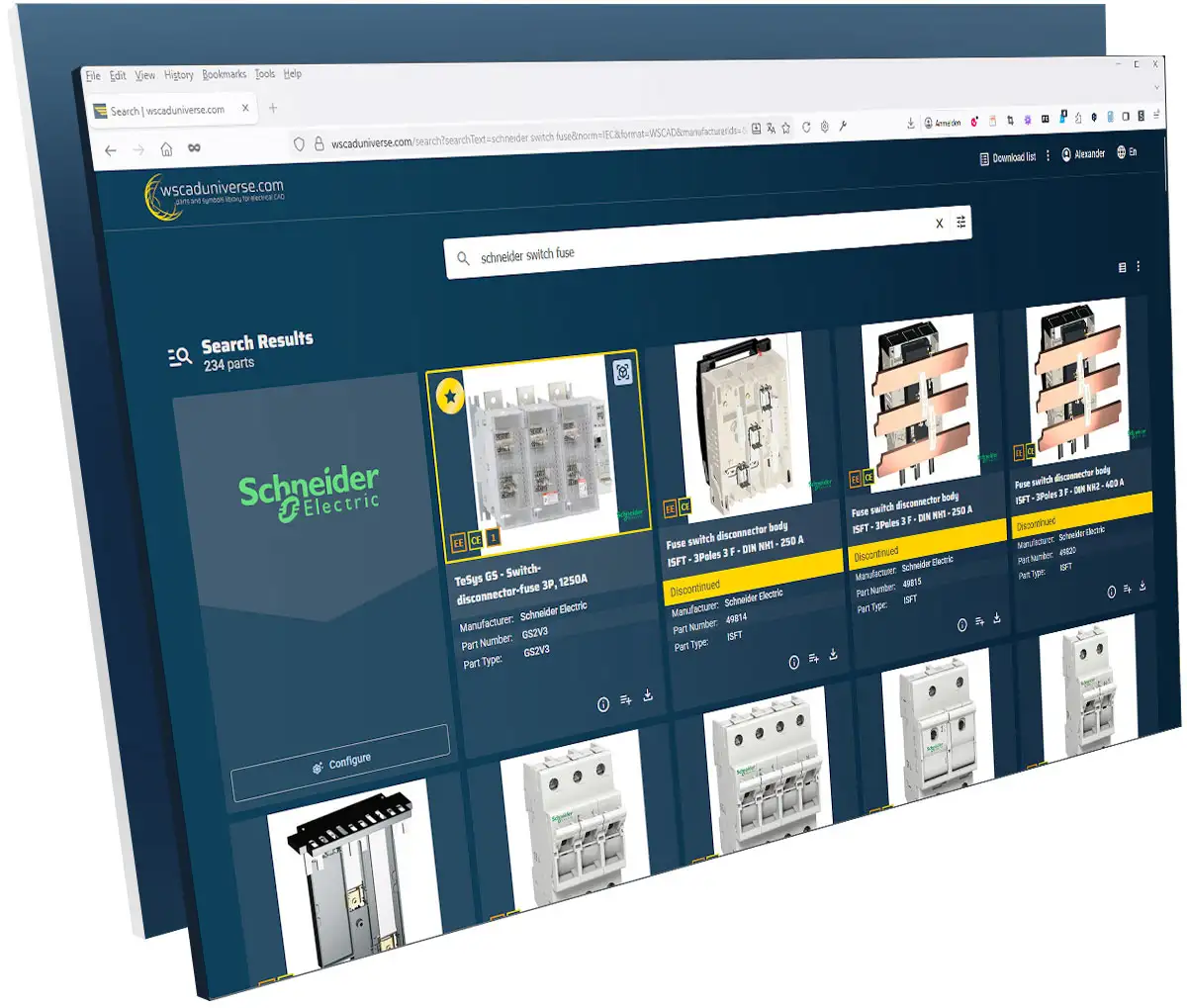
Your Benefits of WSCAD’s free electrical CAD Data Library at a Glance:
- Massive Time Savings: Save between 30 and 120 minutes per part by eliminating manual data entry.
- Maximum Data Precision: Use verified Premium Parts that comply exactly with the WSCAD data standard.
- Seamless Integration: Direct import of data into WSCAD ELECTRIX AI without media breaks or manual file downloads.
- Interdisciplinary Excellence: Data formats for WSCAD, 3D-STEP, DWG, and EDZ ensure collaboration across all engineering disciplines.
- Free to Use: wscaduniverse.com is available to electrical designers at no cost, and all parts data can be used freely in your projects.
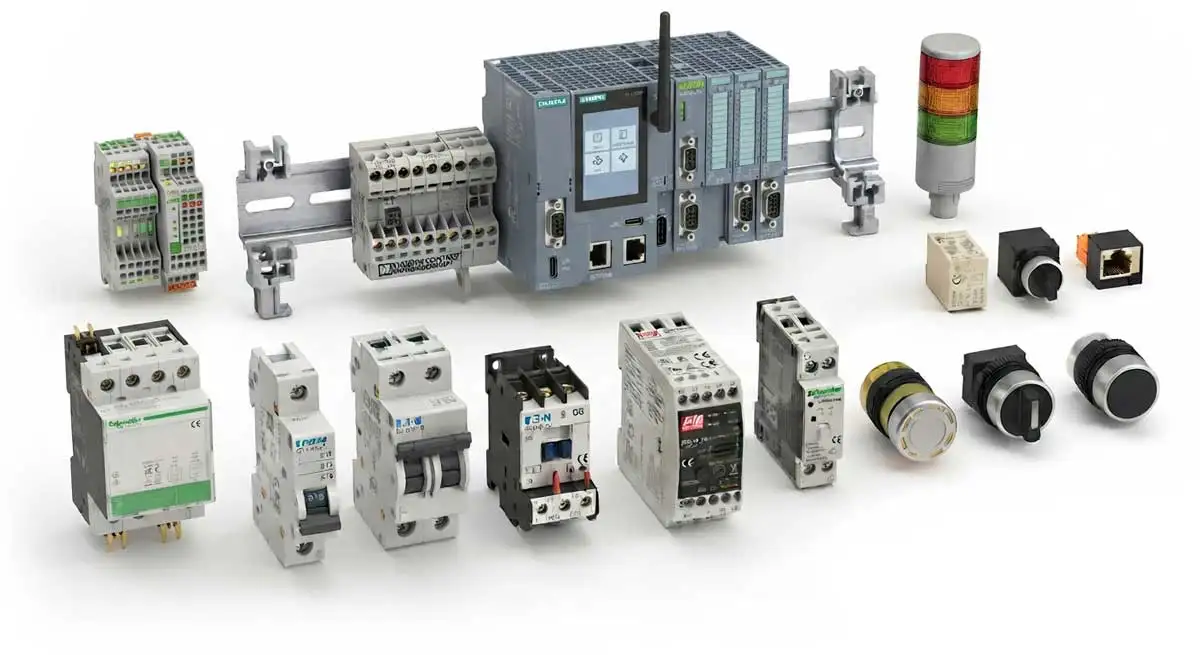
The Four Pillars of High-Quality electrical CAD Data
A simple CSV dataset is no longer enough to meet the requirements of modern manufacturing and digital twins. wscaduniverse.com delivers data covering three critical areas:

AI Parts Data Search
Use AI to quickly find part information such as current, voltage, dimensions, weight and other technical specifications, even if the component is not yet available in wscaduniverse.com. The AI provides the necessary information to support manual part creation and significantly reduces the time required to create new parts.
Functional & Logical Data (Schematic)
For circuit diagrams, we provide the “intelligence” behind each component, including logical symbols, correct connection points and technical specifications. Thanks to support for manufacturer-independent standards, components understand their own logic within ELECTRIX and automatically provide all the information required, including symbols and macros for electrical and cabinet engineering.
Physical Data (Digital Twin & Cabinet)
High quality 2D footprints and 3D models in STEP format, which are automatically converted into OBJ files in ELECTRIX, provide the foundation for modern control cabinet engineering. They enable precise collision detection in the 3D model, automatic wire length calculation and direct control of NC machines for manufacturing.
Free Cross Platform Part Data
Although wscaduniverse.com is optimised for WSCAD ELECTRIX, you can download free part data not only in the WSCAD format, but also in DWG, EDZ and STEP formats for use with your preferred electrical CAD software.
We can easily create our own symbols, assign part data and store them in the WSCAD part database. In this respect, WSCAD is clearly superior to our previous system..
Sailectron Services GmbH
Lukas Vrecer (Managing Director)
The WSCAD Data Standard: A Promise of Quality
On wscaduniverse.com, parts marked with a gold star are Premium Parts. These high quality datasets are created and verified by our Premium Partners, including industry leaders such as Siemens, Schneider Electric, Phoenix Contact, WAGO and Weidmüller, in close cooperation with WSCAD.
Premium Partners – A Mark of Engineering Data Excellence
Only selected manufacturers that meet WSCAD’s highest standards for data quality can become Premium Partners. Working closely with WSCAD, industry leaders such as Siemens, Schneider Electric, Phoenix Contact, WAGO and Weidmüller create and maintain Premium Parts according to the latest WSCAD data standard.
For users, the Premium Partner badge is a mark of trusted quality. Premium Parts provide complete, manufacturer verified and continuously maintained engineering data, ensuring maximum reliability, seamless integration with WSCAD ELECTRIX AI and significantly less manual data creation.


High quality product data and data consistency are of the utmost importance because all subsequent engineering processes depend on them.
WAGO Kontakttechnik
Alexander Krahner (Administrator CAE Applications)
Workflow Turbo: Four Ways to Your Component
The efficiency of wscaduniverse.com is reflected in the flexibility of its data import. The system thinks along with you and protects your database from inconsistencies:
- Direct Import: From the Software into the Design
You do not need to leave the WSCAD environment. Call up the library directly in WSCAD ELECTRIX AI, for example with the AI Copilot. A single prompt in the AI Copilot or a single click on the import icon transfers the part, including all symbols, immediately to your local database and the Symbol Explorer, ready for placement by drag and drop. - Pro Tip: Avoid Duplicate Parts
The system features an integrated duplicate check. If a part already exists in your local database, you are asked whether you want to overwrite it or keep it. This ensures data integrity. - BOM Upload: Mass Data Processing in Seconds
Manual individual import is not an option for large scale projects. Upload an external Bill of Materials (BOM) as an Excel or CSV file. The system automatically validates up to 5,000 parts simultaneously against the database. Matching parts can be downloaded collectively as a ZIP data package and imported into your software.
Even uploaded photos of parts lists, including handwritten lists, are interpreted by AI. The recognised parts are automatically identified and imported into your local parts database.
- Intelligent BOM Analysis: Automatic Validation and Categorisation
After the Bill of Materials (BOM) upload, an automatic categorisation takes place. You can immediately see which parts were found exactly, where typos may exist, and for which parts you should submit a Part Request. - The WSCAD Cart Import: The Bridge to the Manufacturer
Many manufacturers offer an “Export to wscaduniverse.com” button on their websites or in configurators. Configure complex assemblies directly at the manufacturer’s website and transfer the entire wish list or shopping cart to your wscaduniverse.com download list with a single click. This eliminates the need to search for and import each part individually using copy and paste. - wscaduniverseGO: Browser Extension for Instant Access
With the wscaduniverseGO browser extension, simply highlight a part number on any website. The add on immediately searches the database for availability, 3D models and datasheets. In combination with WSCAD ELECTRIX AI, you can also import components directly into the running WSCAD ELECTRIX AI from common web browsers such as Chrome and Firefox.

wscaduniverseGO
Simply select the desired text, e.g. the part number, and click the right mouse button on the new entry in the context menu of your browser. The search results are opened in a new tab and can easily be added to the wscaduniverse.com download list.

Import your parts directly from the browser
You can now import parts from wscaduniverse.com via your browser, without reloading or manually importing them into ELECTRIX!
We can easily create our own symbols, assign part data and store them in the WSCAD part database. In this respect, WSCAD is clearly superior to our previous system.
Sailectron Services GmbH
Lukas Vrecer (Managing Director)
Success Story
Fraport – Frankfurt Airport Terminal 3
- Client: Fraport Ausbau Süd GmbH, the operating company of Frankfurt Airport.
- The Challenge: Managing one of Germany’s largest building projects: designing the complete building and room automation for Terminal 3 of Frankfurt Airport. The team had to handle 150,000 automation functions, 90,000 data points, and 240 controllers across 1,500 rooms without losing data consistency.
- The Solution: WSCAD served as the central engine for automated data point keys and standardized documentation without data breaks, errors, and time delays. They specifically cited the ability to easily implement BACnet object-related function lists according to VDI 3814 and allocate structure identifiers according to IEC 81346.
We value the automatic generation of data point keys and the ability to change them quickly and easily afterwards.Uwe Eckardt (Fraport Ausbau Süd GmbH) - The Result: A seamless, error-free engineering process and a reliable Digital Twin for long-term facility management.

The design of the building and room automation for the check-in hall in the new Terminal 3 at Frankfurt Airport is done with the electrical CAD solution from WSCAD. (Visualisation by MOKA Studio)
Our suppliers prefer providing their product data via wscaduniverse.com because, unlike other providers, there are no publishing fees. This increases the likelihood of finding more, and above all always up to date, part data immediately.
NW-Niemann GmbH
Holger Pawel (Managing Director)
Frequently Asked Questions (FAQs)
Q: What is wscaduniverse.com?
A: wscaduniverse.com is the world’s largest free electrical CAD data library, provided by WSCAD GmbH. It gives electrical engineers direct access to over 2.2 million part data items from more than 441 manufacturers – including Siemens, Schneider Electric, Phoenix Contact, WAGO, and Weidmüller. The library is used by more than 145,000 electrical CAD users worldwide and records over 2.1 million search queries and 990,000 downloads annually. It provides all the data needed for professional electrical schematic design and cabinet engineering: logical symbols, physical 2D footprints, 3D STEP models, and full technical specifications. The platform is eClass-compatible and is available as a native cloud application, fully integrated into WSCAD ELECTRIX AI.
Q: Is wscaduniverse.com free to use?
A: Yes. wscaduniverse.com is completely free of charge for electrical designers and engineers. There are no subscription fees, no download limits, and no licence costs for the part data itself. Manufacturers also pay no publishing fees to list their products in the library, which means you consistently find current, up-to-date data from a broad range of suppliers.
Q: How much time can wscaduniverse.com save in my engineering projects?
A: Using wscaduniverse.com saves between 20 and 60 minutes of engineering time per component, compared to manual data creation. For more complex parts, time savings of up to three hours per item are common. Instead of manually creating symbols, entering pin configurations, and searching for datasheets, engineers retrieve ready-to-use data with a single click or prompt. Project lead times can be shortened by up to 40%.
Q: Do I need WSCAD ELECTRIX AI to use wscaduniverse.com?
A: No, you do not need WSCAD ELECTRIX AI to access the library. Part data is available for download in DWG, EDZ, and STEP formats, which can be used with other electrical CAD applications. This is also relevant for engineers who previously relied on EPLAN’s own data portal but no longer have access to it: wscaduniverse.com is available to all users at no cost, regardless of their primary software. However, the full benefits – including direct import without leaving your design environment, AI-powered parts search, and automated BOM validation – are available exclusively with WSCAD ELECTRIX AI.
Q: How do I import parts from wscaduniverse.com into WSCAD ELECTRIX AI?
A: There are several ways to import parts directly into your project:
- From within ELECTRIX AI: Call up the library directly via the AI Copilot – a single prompt or one click on the import icon transfers the part, including all symbols, to your local database and the Symbol Explorer, ready for drag-and-drop placement.
- BOM upload: Upload an existing Bill of Materials as an Excel or CSV file. The system automatically validates up to 5,000 parts simultaneously against the database, and matching parts can be downloaded collectively as a ZIP package.
- wscaduniverseGO browser extension: Highlight any part number on a manufacturer’s website, right-click, and the extension searches the database instantly. Compatible with Chrome and Firefox.
- Manufacturer cart import: Many manufacturers offer an “Export to wscaduniverse.com” button directly in their online configurators, allowing entire component selections to be transferred at once.6 and the AMEV standard.
Q: What are Premium Parts, and how are they different from standard parts?
A: Premium Parts are marked with a gold star on wscaduniverse.com. They are created and continuously maintained by selected manufacturers – called Premium Partners – in close cooperation with WSCAD, strictly following the WSCAD data standard. Premium Parts include complete logical data (symbols, connection points, technical specifications), high-quality 2D footprints, and verified 3D STEP models. For users, the gold star is a mark of trusted quality: these datasets are manufacturer-verified, always up to date, and seamlessly compatible with WSCAD ELECTRIX AI.
Q: Which manufacturers are available on wscaduniverse.com?
A: The library covers more than 441 manufacturers. Premium Partners include Siemens, Schneider Electric, Phoenix Contact, WAGO, Weidmüller, Eaton, ABB, Rockwell Automation, Beckhoff, Festo, Rittal, SEW, Pepperl+Fuchs, Murr Elektronik, LAPP, and many more. If a manufacturer you need is not yet in the library, you can submit a Part Request directly through the platform. WSCAD also offers a service to create individual part datasets on your behalf, which is included in Plus and Premium maintenance agreements (10 and 20 datasets per year respectively).
Q: What happens if a part I need is not yet in the library?
A: If a specific part is not yet available in wscaduniverse.com, several options are available. You can use the AI Parts Data Search to retrieve technical specifications – such as current, voltage, dimensions, and weight – directly from the AI, even for components not yet in the database. This significantly reduces the time needed for manual part creation. You can also submit a Part Request via the platform. Additionally, WSCAD maintenance contract holders on Plus or Premium tiers have 10 or 20 individual part creations included per year as a service.
Q: Can wscaduniverse.com help with Bill of Materials processing for large projects?
A: Yes. The BOM upload feature is designed specifically for large-scale projects. Upload an Excel or CSV file containing up to 5,000 part numbers, and the system automatically validates and categorises each entry: exact matches, near-matches with potential typos, and parts not yet in the database are displayed separately. Matched parts can be downloaded collectively and imported into WSCAD ELECTRIX AI in one step. Even photos of parts lists, including handwritten ones, are interpreted by AI.
Q: What data formats are available for download?
A: wscaduniverse.com provides part data in the following formats:
- WSCAD native format – for direct use in WSCAD ELECTRIX AI (includes logical symbols, macros, and technical data)
- DWG – for AutoCAD-compatible electrical CAD applications
- EDZ – the EPLAN-compatible format
- STEP – 3D models for digital twin creation and cabinet engineering, automatically converted to OBJ files within ELECTRIX AI for collision detection and wire length calculation
The library is also eClass-compatible, supporting structured product classification across engineering systems.
Q: How does wscaduniverse.com support cabinet engineering and digital twins?
A: For cabinet engineering, wscaduniverse.com provides high-quality 2D footprints and verified 3D STEP models. Within WSCAD ELECTRIX AI, these STEP files are automatically converted to OBJ format, enabling precise collision detection in the 3D cabinet layout, automatic wire length calculation, and the generation of NC manufacturing data for machines such as Steinhauer, Komax, and Rittal/Kiesling – all directly from the cabinet design, without additional modules or costs.
Q: Does wscaduniverse.com prevent duplicate parts from entering my database?
A: Yes. The system includes an integrated duplicate check. When importing a part that already exists in your local database, WSCAD ELECTRIX AI prompts you to choose whether to overwrite the existing entry or retain it. This protects data integrity across your projects.
Q: What is wscaduniverseGO?
A: wscaduniverseGO is a free browser extension for Chrome and Firefox. When you highlight any part number on a manufacturer’s website or online shop, wscaduniverseGO immediately searches the wscaduniverse.com database for availability, 3D models, and datasheets. The search results open in a new tab, and parts can be added to the wscaduniverse.com download list directly. Combined with WSCAD ELECTRIX AI, you can import all selected components from the download list into the running software with a single click, without switching applications or downloading files manually.
Q: Is there a mobile app for wscaduniverse.com?
A: The WSCAD Cabinet AR App (available free of charge for iOS and Android) allows maintenance engineers and service technicians to access wscaduniverse.com data directly on site. By scanning a component’s QR code or part number, the app immediately displays all associated information via augmented reality: complete part data, 3D views, reference identifiers, function texts, manufacturer details, and the component’s position in all electrical schematics. This makes fault diagnosis significantly faster, enables quick ordering of replacement parts, and allows field changes to be communicated to the design team instantly.
Q: How does wscaduniverse.com use AI?
A: wscaduniverse.com integrates AI in two ways. First, the AI Parts Data Search retrieves technical specifications for components not yet in the library, reducing manual part creation time significantly. Second, within WSCAD ELECTRIX AI, the AI Copilot can access the entire library via a natural language prompt, allowing engineers to find, import, and place components without leaving the design environment. BOM photo recognition – including handwritten lists – is also powered by AI.
Q: Can I switch component manufacturers easily once my project is started?
A: Yes. Because all components in the library are structured to the WSCAD data standard, swapping one manufacturer’s component for another’s – for example, replacing one range of terminals or contactors with an alternative brand – updates the associated symbols, part data, and technical parameters automatically. This makes design changes and cross-manufacturer comparisons significantly faster than manual re-entry
Q: Is wscaduniverse.com relevant for electrical engineering disciplines beyond schematic design?
A: Yes. The library serves multiple engineering disciplines supported by WSCAD ELECTRIX AI: electrical engineering (electrical schematics), cabinet engineering (3D layout and NC manufacturing), fluid engineering (fluid diagrams), and building automation, among others. The availability of STEP, DWG, and EDZ formats also makes the data usable across disciplines and software environments.
Q: What advantages does wscaduniverse.com offer for component manufacturers?
A: For manufacturers, wscaduniverse.com is a direct channel to more than 145,000 electrical CAD users worldwide. Listing products in the library is free of charge, and WSCAD handles the operational infrastructure. Manufacturers who do not wish to create their own datasets can commission WSCAD to produce them at low cost. The platform also includes an analytics tool that provides aggregated, non-personal usage data: which products are downloaded, which search terms are used, and which countries are using the data. This enables manufacturers to draw meaningful conclusions about data availability, product relevance, and market coverage.


