
 Building Automation
Integrated electrical CAD & BA Solutions for Smart Building Automation Design
Effective building and room automation design must be consistent, holistically designed, and compliant with evolving technology and regulations to avoid data discontinuity, errors, and delays.
- System Management: BAS manages critical functions including HVAC, lighting, energy, safety, and security.
- Core Benefits: BAS helps optimize performance, ultimately improving energy efficiency and reducing operating costs.
- Customer Focus: A primary goal is enhancing occupant comfort and lowering maintenance costs.
- Mechanism & Architecture: These systems integrate sensors, controllers, and software to monitor operations, leveraging widely adopted open standards like BACnet and Modbus for communication.
- Compliance Foundation: The systems adhere to codified industry standards, such as VDI 3814 and DIN EN ISO 16484, which is essential for project success

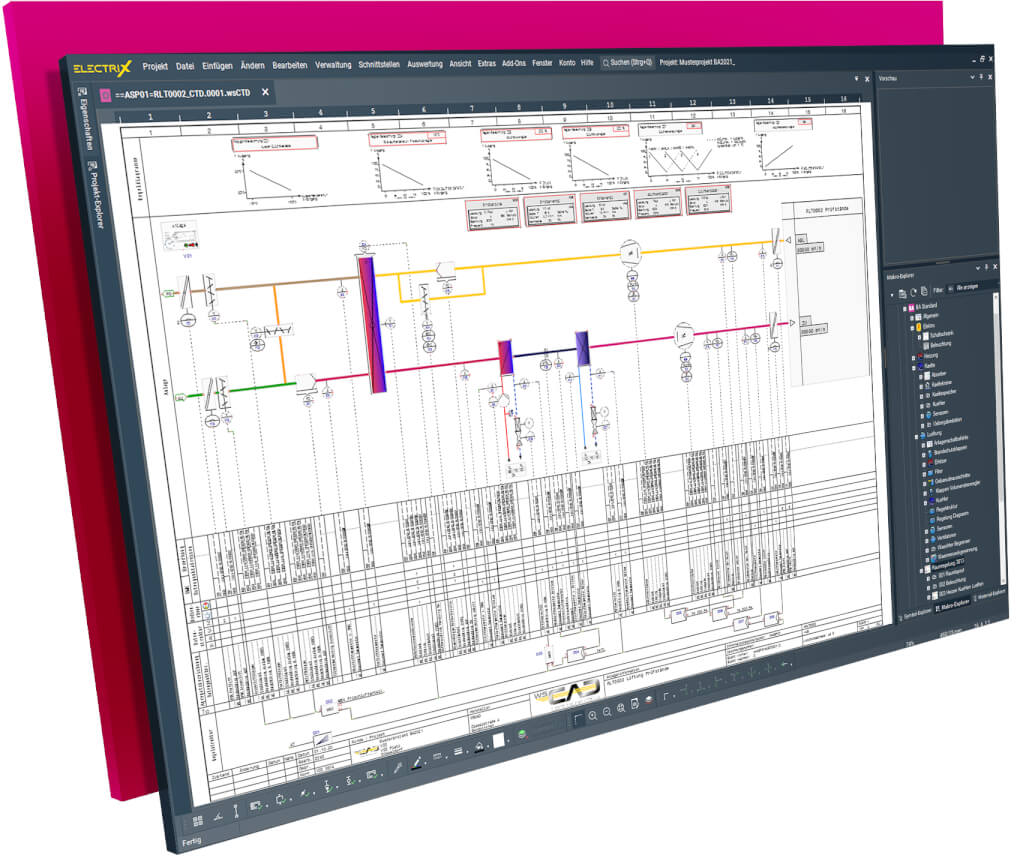
WSCAD ELECTRIX Buidling Automation disciplin at a glance
- Building automation function lists, designing and documentation in accordance with the new VDI 3814 series of guidelines as well as the standards DIN EN ISO 16484 and DIN 18386
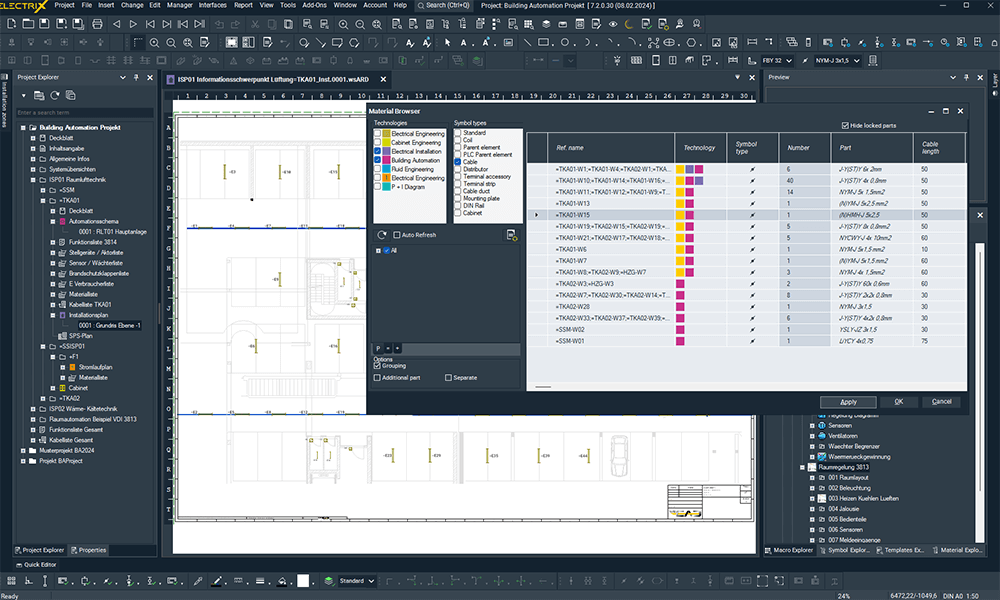
- Generation of valve, cable, commissioning and parameter lists as well as lists of materials
- Format-independent automation diagrams
- Design and implementation
- Installation, plant and inventory planning
- Creation of system and network overviews
- Automation and field device documentation
- Independent representation of control structures and data points
- Freely configurable data point keys
- Direct assignment of data points to channels of automation devices
- Structuring in accordance with AMEV or IEC EN 81436
- Automated plant identification key incl. the KKS (power plant identification key) as well as the data point key for building automation
- Comprehensive system macros
- Integration of graphics and functional descriptions
- Importing of floor plans and drawings from DWG/DXF or PDF files
- Export of intelligent PDFs with cross-references for documentation, access via standard PDF viewer or the WSCAD Cabinet AR App for service and maintenance
- Quantity computation
Design the entire building automation process with one software
Holistic planning for reliable building and room automation
WSCAD ELECTRIX AI is a next-generation platform designed to meet the challenges of building automation planning. It provides a powerful, all-in-one electrical CAD solution that unifies six engineering disciplines, enabling a continuous data flow from design through production and service. By integrating AI-powered tools and enforcing adherence to standards like VDI 3814 and BACnet, WSCAD transforms the stringent electrical design process into an accelerated, reliable, and standards-compliant workflow. This approach is essential for large-scale, intricate projects, such as the planning required for Frankfurt Airport’s new Terminal.
Get to know the Building Automation discipline of WSCAD’s electrical CAD software ELECTRIX
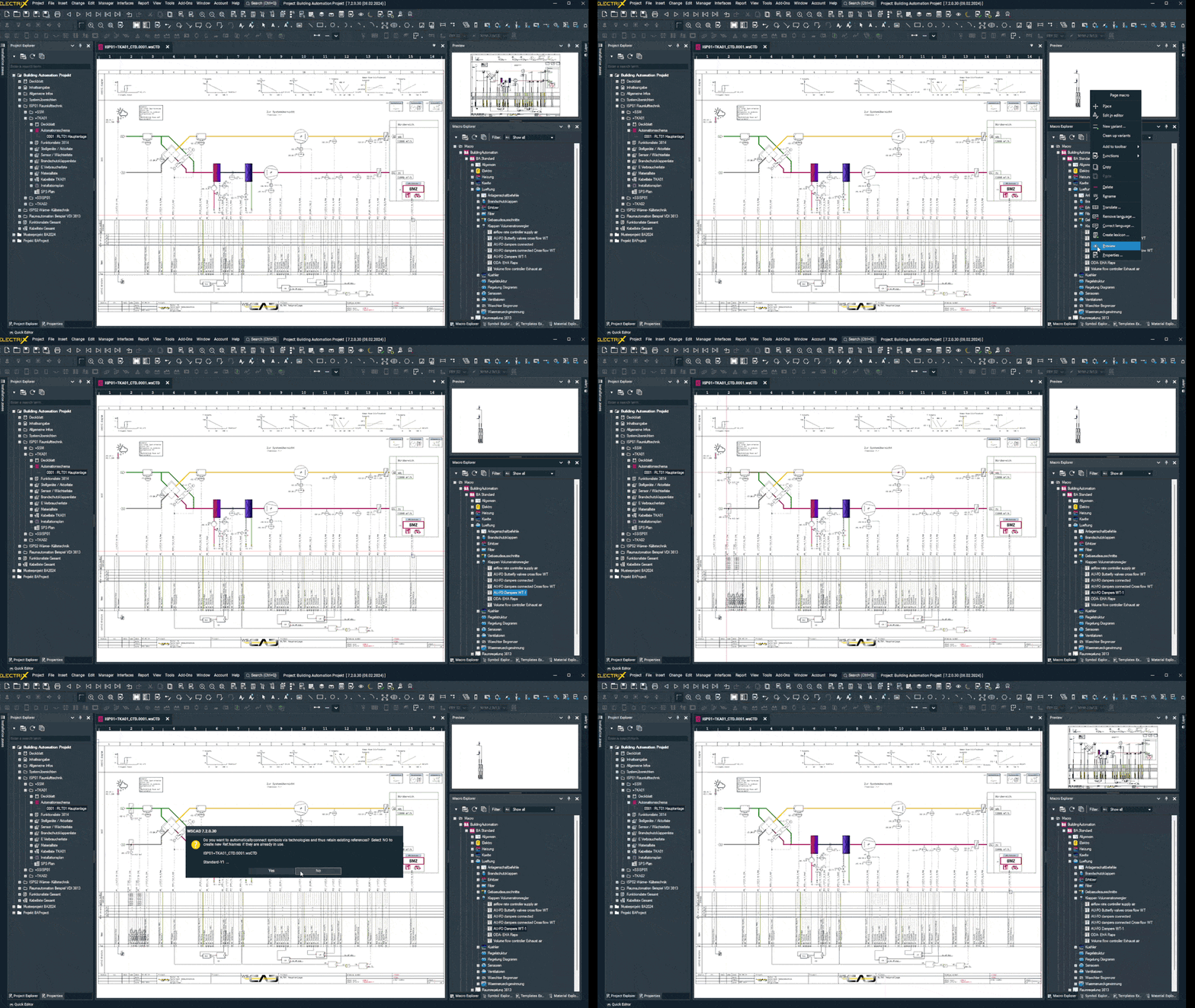
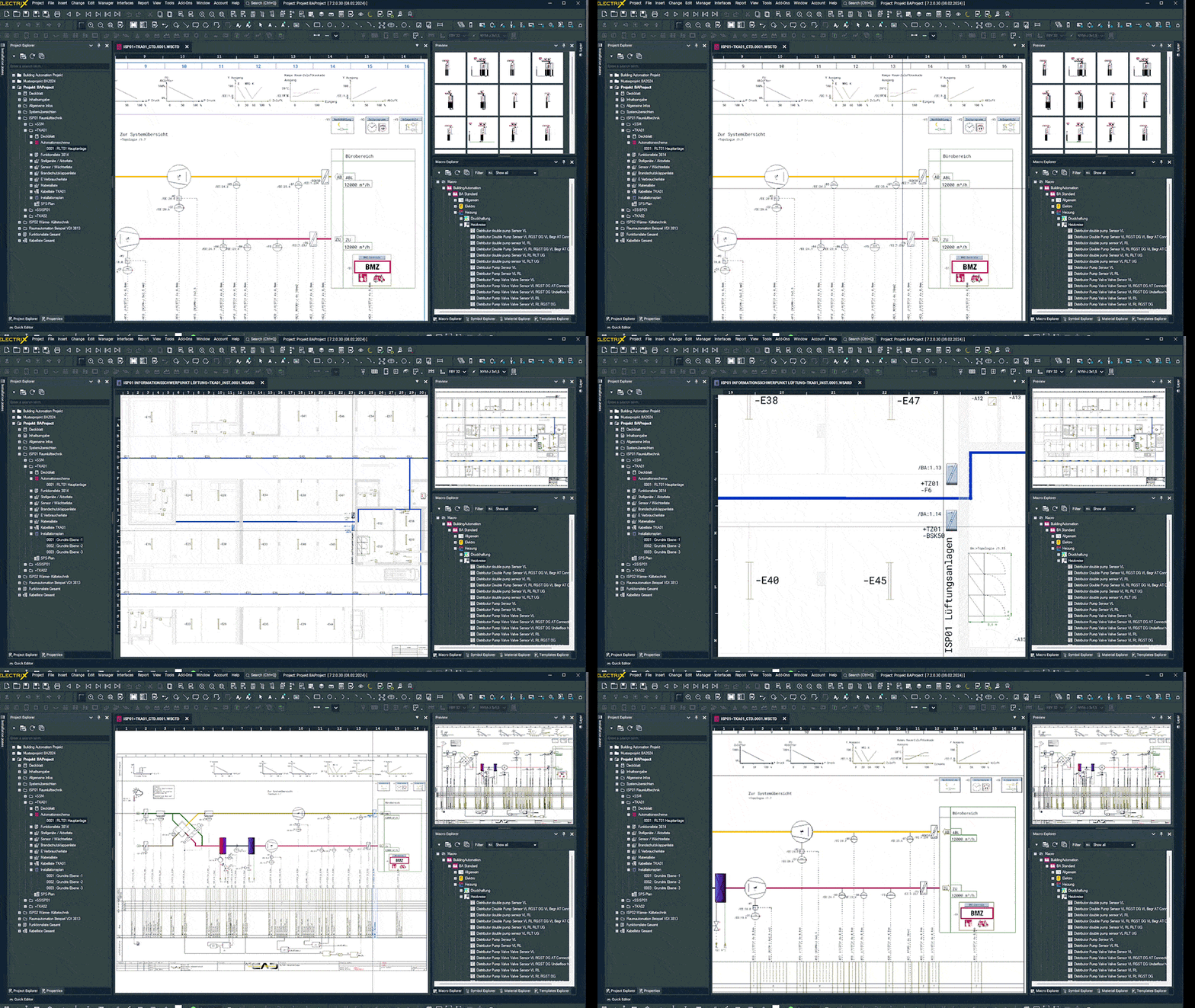
Core Features & Standards-Driven BA Design
The Building Automation module is not merely a drafting tool; it is a specialized environment designed to master the complexity of modern smart buildings. This section highlights how WSCAD enforces standards and streamlines data management, transforming BA design into an accelerated, reliable, and continuous workflow.
The AI Copilot: Command Center of Efficiency (BA Focus)
The AI Copilot represents a fundamental shift in managing labor-intensive BA tasks. It delegates complex documentation and verification processes via simple text commands, freeing engineers from manual, hours-long checking.
- Documentation Generation: Delegate the instant creation of VDI-compliant documents. A simple command instantly generates a Bill of Materials (BOM) or a Function List (BA-FL).
- Data Point Command & Query: Use the AI to instantly query, assign, or retrieve complex data points from controllers or search across multiple projects.
- Bulk Placement/Structuring: Execute complex placement commands in seconds, such as bulk placing standardized AHU (Air Handling Unit) macros.
“What an experienced designer used to have to check manually—often over hours—the AI now does in just a few seconds.”
Application EngineerBAELTEC
Data Point Management & Standards Compliance
Compliance is non-negotiable in BA. WSCAD guarantees data consistency and documentation authority by making standards adherence an inherent part of the design structure.
- Central Data Point Management: All data points are captured and stored in a central database. They can be assigned to Automation Stations (DDC/PLC) before schematic creation, which eliminates redundant data entry and prevents errors.
- Standards Enforcement: Design and documentation adhere strictly to industry guidelines, including VDI 3814, VDI 3813, BACnet, and DIN EN ISO 16484.
- Automated Identification: The system supports automated Plant Identification Keys (PIK/AKS) 9999and standard-compliant marking, allowing representation according to IEC DIN EN 81346 and the AMEV-BACtwin system on the same sheet.
For us a particularly convenient feature of the WSCAD solution is the option to use structure identifiers according to IEC 81346. The possibility to use structure identifiers makes it easy to define subsystems...
Uwe EckardtFraport Ausbau Süd GmbH
Workflow Acceleration & Integration Tools
The module provides specialized tools for rapid project setup, layout, and modification, saving time from initial planning to documentation handover.
- Project Wizard Automation: The Project Wizard Add-On generates complete BA schematic packages (including schematics and function lists) for standardized systems, condensing engineering time from weeks to mere minutes.
- WSCAD Building AR App: This unique app allows engineers to scan rooms with a mobile device to generate accurate DXF/PDF floor plans, which can then be imported into the electrical installation plan as a background when original plans are missing or inaccurate.
- Macro Variants & Flexibility: Complex schematics are built using powerful macros. The system’s unique flexibility allows for rapid component exchange and macro variants (e.g., swapping 120 sensors for a different make with a single click).
“Because WSCAD is simply very flexible, does not have a rigid concept like many other software solutions we know, and offers an extremely wide range of options. (...) With a single click, 120 sensors can be quickly switched to a different manufacturer.”
Michael DietrichGA Pro Engineering
Intelligent Quality Assurance & Final Deliverables
Quality assurance extends beyond error checks to securing the documentation’s value throughout the building’s operational lifecycle.
- Lifecycle Documentation Value: The system ensures data captured once (e.g., component properties, data points) is continuously available and reusable from planning through the operating phase.
- Smart Documentation Handover: Final documentation is generated as an Intelligent PDF with hyperlinked cross-references (jump function), simplifying navigation for maintenance technicians and project reviewers.
- Selective Reports & Quantity Take-off: Generate specific, focused reports essential for procurement or commissioning, such as lists for sensors, consumption, or commissioning, using material list flags.
“Data that has been captured once can be used throughout the entire planning and life cycle of buildings. This benefits us as planners, but also cabinet builders and electricians on the construction site or facility management in the operating phase.”
Michael DietrichGA Pro Engineering
The WSCAD Ecosystem: BA Standards, Integration, and Lifecycle
Seamless Digital Integration
WSCAD ELECTRIX is designed as an open system that ensures a continuous data flow, connecting design, production, and service for the entire product lifecycle.
- Continuous Digital Twin: The project data, or “digital twin,” can be used for service, maintenance, and retrofits, allowing changes to be tracked and documented. Changes from production, such as redlining notes or wiring status, can be fed back into the design via the Cabinet AR app.
- Manufacturing and Enterprise Integration:
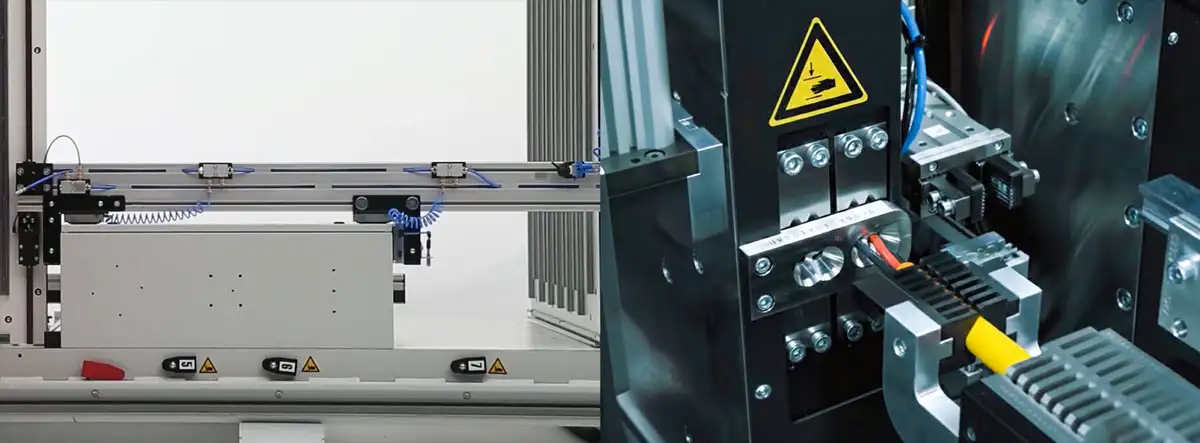
- NC/CNC Data: Export data for cabinet doors and mounting plates for direct transfer to NC machines from manufacturers like Kiesling and nVent HOFFMAN (Steinhauer), eliminating the need for additional mechanical CAD software.
- Wire Production: Generate data for the automated production of wires and wire sets via service providers (CadCabel) or direct connection to machines from Komax or nVent HOFFMAN (Steinhauer).
- ERP/PLM/MES: Interfaces are provided for integration with enterprise-level systems to ensure a seamless fit into existing workflows without data loss.
Technical Deep Dive: Practical Workflow Scenarios
The core of WSCAD ELECTRIX lies in automating and simplifying complex, time-consuming daily workflows. Here are examples of how engineers leverage the software:
- Accelerated Layout Review: Instead of manually searching the database for a component’s 3D model, an engineer checks the cabinet’s 3D view (using Ctrl + O). If a component appears as a schematic cuboid, they use the system to quickly check if the part and 3D model exist in com.
- Instant Documentation Generation: An engineer delegates multiple routine tasks simultaneously with a single command to the AI Copilot: “Create a material list and a terminal diagram”. This replaces over 10 clicks and is executed in seconds, providing a fully populated Excel file.
- On-Site Wiring and Maintenance: A maintenance technician scans a WSCAD QR code on a component using the Cabinet AR App. The app instantly displays the part number, function text 45, and allows the technician to immediately jump from the cabinet page to the corresponding wire in the project schematic (PDF file) for troubleshooting.
- Component and Sizing Selection: Instead of consulting tables or manuals, an engineer types: “Give me a blue copper wire, 24V DC, 64A”. The AI Copilot instantly calculates and presents a 16mm2 wire with the correct attributes, speeding up the design process and ensuring accuracy.
- Preventing Production Errors (Cabinet Expert): During the design phase, the engineer performs a quick check via the Cabinet Expert module’s features. They use the cabinet wiring function to view the fill level of the cable ducts, and if any section is marked red, they know immediately that they must enforce re-routing or select larger channels before production begins.

Generate BOM with just one prompt in the ELECTRIX AI Copilot
Proof Point:
Large-Scale Standards Compliance
WSCAD ELECTRIX AI is proven to manage massive scale and complexity while ensuring adherence to standards, as demonstrated in one of Germany’s largest infrastructure projects.
- Client: Fraport Ausbau Süd GmbH, the operating company of Frankfurt Airport.
- Scope: Designing the complete building and room automation for Terminal 3, including 1,500 rooms, 240 controls, and 150,000 automation functions.
- Result: Fraport achieved a holistic design without data breaks, errors, and time delays. They specifically cited the ability to easily implement BACnet object-related function lists according to VDI 3814 and allocate structure identifiers according to IEC 81346.

The design of the building and room automation for the check-in hall in the new Terminal 3 at Frankfurt Airport is done with the electrical CAD solution from WSCAD. (Visualisation by MOKA Studio)
Functions of WSCAD BA compared to other software
| Function | Benefit | WSCAD BA | Other MEP software | Other electrical CAD software |
|---|---|---|---|---|
| Interdisciplinary work: BACS – automation schemes -> installation drawing-> circuit diagrams -> cabinet design |
|
|||
| Free customisable datapoint addressing concept |
|
|||
| Working with macros |
|
|||
| Automatic generation of circuit diagrams and BACS – automation schemes |
|
|||
| Own part database (local and online) |
|
| Function | Benefit | WSCAD BA | Other MEP software | Other electrical CAD software |
|---|---|---|---|---|
| Interdisciplinary work: BACS – automation schemes -> installation drawing-> circuit diagrams -> cabinet design |
|
|||
| Free customisable datapoint addressing concept |
|
|||
| Working with macros |
|
|||
| Automatic generation of circuit diagrams and BACS – automation schemes |
|
|||
| Own part database (local and online) |
|
|||
| Free plant structuring acc. to IEC 8134 |
|
|||
| Symbols acc. to IEC 62424 and VDI 3813 and 3814 |
|
|||
| Generation of function lists acc. to IEC 16484 |
|
|||
| Reflection of the data points in information links |
|
|||
| Standardisation of the data points for each device |
|
|||
| Auto connection of devices with connection line |
|
|||
| Intelligent copy-and-paste |
|
|||
| Export of smart PDF |
|
|||
| Sheet size freely definable |
|
|||
| Import of DWG/DXF |
|
|||
| Import of PDF |
|
Start planning Building Automation with ELECTRIX
Final Call to Action
The complexity of modern building planning, driven by strict standards and the need for BIM integration, requires a strategic shift away from fragmented tools. WSCAD ELECTRIX AI empowers your team to master this complexity, ensure VDI-compliant documentation, and achieve data integrity across the entire project lifecycle. Stop struggling with manual data synchronization and gain the strategic advantage of integrated electrical CAD.
Request Your Free, No-Obligation ELECTRIX AI Demo Now!
Licensing and Accessibility Summary
The AI-powered features in ELECTRIX AI, including the Copilot and automated layout generation, are included at no extra cost in the normal subscription license1. WSCAD ensures this revolutionary technology is accessible to companies of all sizes. A free, complete version (ELECTRIX ROCKET Ultimate, which includes all modules and add-ons) can be tried without obligation.
Frequently Asked Questions (FAQs)
Q: Does the software support the specific standards required for BA design?
A: Yes. design and documentation are performed in strict accordance with guidelines such as VDI 3814 (buildings), VDI 3813 (rooms), and the standard DIN EN ISO 16484.
Q: How is data point consistency maintained in large BA projects?
A: The software features Central Data Point Management, where all data points are stored in a central database and can be captured and assigned to Automation Stations (DDC/PLC) before schematic creation.
Q: What are the two expansion stages available for Building Automation?
A: The discipline is offered in two stages: BA Control (for BA planners and MCR companies) and BA Project (which adds comprehensive electrical and cabinet planning).
Q: How can I create floor plans if the original drawings are missing?
A: The WSCAD Building AR App uses Augmented Reality technology to scan rooms with a mobile device and convert them into floor plans (DXF/PDF) for import as a planning basis. Free download from the Apple App Store and Google Play Store.
Q: How quickly can I generate a BOM or Function List?
A: Generating detailed lists, including quantity take-off for materials or function lists (GA-FL), can be done with a simple text command to the AI Copilot in a matter of seconds.
Q: How does AI help address the skilled labor shortage?
A: The AI Copilot offers intuitive guidance and can perform tasks previously reserved for experts, allowing less experienced employees to become productive quickly, relieving pressure on senior engineers.
Q: Is my project data safe when using the AI Copilot?
A: Yes, WSCAD offers a sophisticated security concept. All entries are end-to-end encrypted, and the chat history is deleted after each session, ensuring user anonymity and data protection.
Q: Does WSCAD support integration with PLC programming environments?
A: Yes, the integrated PLC Manager allows data points to be assigned directly to PLC channels, making them immediately available across disciplines.
Q: What is the main benefit of using macros and macro variants in BA?
A: The use of macros allows for the quick design of schematics and function lists, resulting in enormous time savings. Macro variants allow you to swap similar components (e.g., 120 sensors) with a single click.
More information of Building Automation with ELECTRIX from WSCAD
Further information / News Posts / Technical Article
 |
ELECTRIX AI The world’s first and only electrical CAD software – including the Buidling Automation module. Read more |
 |
Mit KI wird der Konstrukteur zum Dirigenten Interview von Klaus Paukovits (TGA-Chefredakteur) mit WSCAD CEO Axel Zein und Vertriebsleiter Jürgen Panhölzl auf der TGA Website. Read more |
 |
Gebäudeautomation nach VDI 3814 – Kennzeichnungssysteme als Grundlage der Digitalisierung WSCAD Blog post Read more |
 |
Mit WSCAD durchgehend vom Datenpunkt bis zur Steuerung in den Schränken planen Gebäudeautomation mit Software von WSCAD Read more |
Information material
- Building Automation with WSCAD ELECTRIX
Download info brochure - White paper Building Information Modelling (BIM)
Request white paper - Fraport is designing building and room automation with WSCAD
Download case study - EI&C company and cabinet engineering manufacturer VOGL Elektromeisterbetrieb GmbH, Teisnach, Germany
Download case study
How to use the WSCAD ELECTRIX electrical CAD
- How to: Show date of last page change in frame
Watch tutorial - How to: Create your own color codes for cables
Watch tutorial - How to: Use the right placeholders in forms
Watch tutorial
Get the WSCAD ELECTRIX trial version
Try now the latest version of the electrical CAD software from WSCAD for free
Test the complete WSCAD ELECTRIX demo, including all the modules for free. Simply fill in the form and we will send you an email with the download link.
What you can expect:
- Test all functions for 30 days without obligation
- Highest expansion level of the software with all six electrical design disciplines
- AddOn “ProjectWizard” pre-installed
- Completely free of charge – no credit card details required


